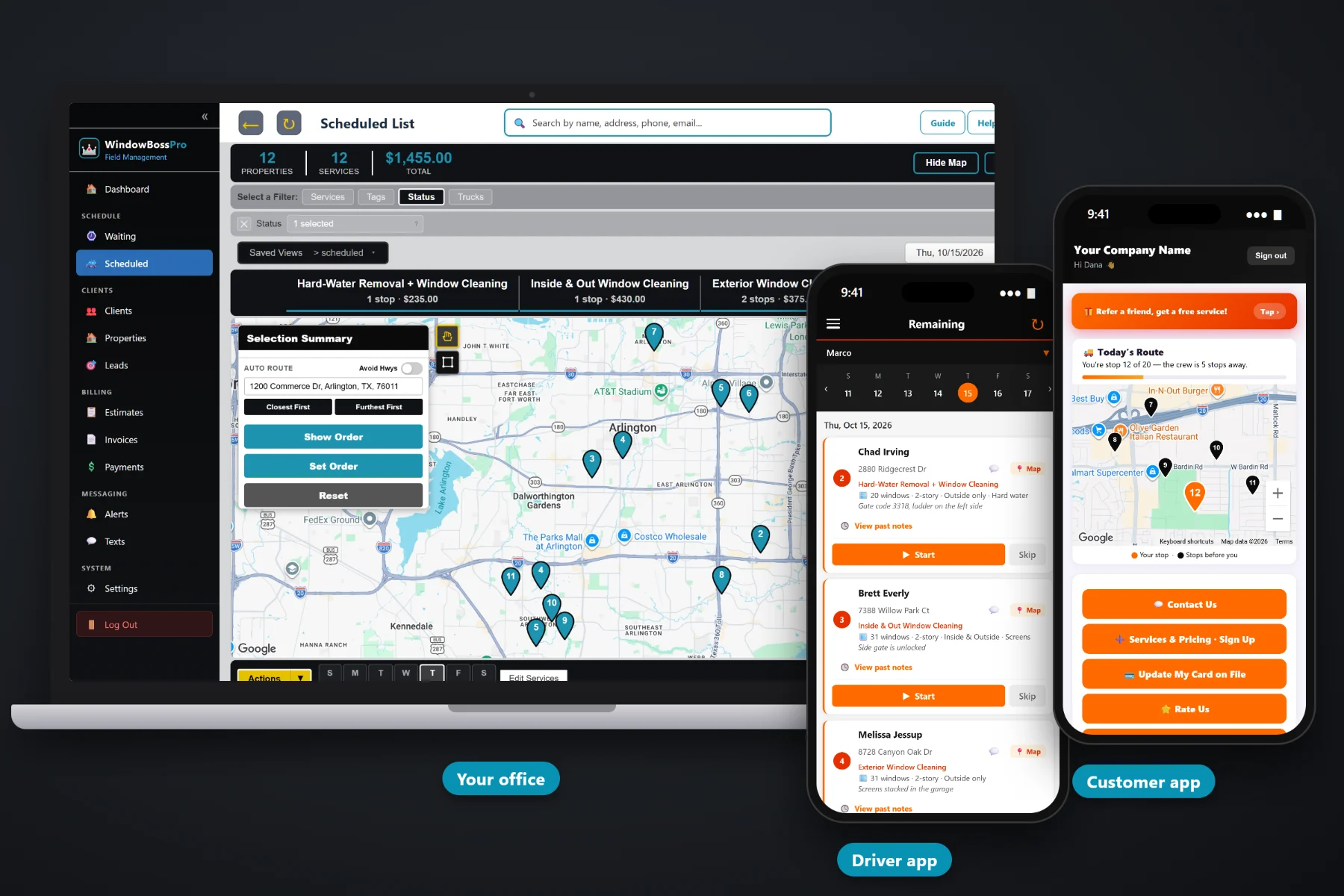
Every window cleaning job starts with a number. WindowBossPro builds that number from your own service list — per window, per screen, story add-ons, inside and outside, hard-water removal — sends the customer an estimate they can approve online, and turns the approved estimate into scheduled cleanings. Enter the window count, stories, sides, extras and access notes on the job once, and the tech sees them on every visit after that.
Plans start at $59/month and you are never billed per user, so the owner, the office and every estimator can build quotes. Your service list, online approval, website forms and the hand-off from estimate to schedule are part of the platform, not an add-on. To see how quoting fits with routing, recurring cleanings, the tech app and billing, start at WindowBossPro and then dig into the quoting side here.
Per window, per screen, story add-ons, tracks, hard water. Set your prices once and every estimate pulls from them.
Enter window count, stories, sides and extras on the job once, and every visit after shows “28 windows · 2-story · Inside & Outside.”
Customers open the estimate and approve it themselves. No chasing a signature or reading numbers over the phone.
An approved estimate becomes scheduled services, one-time or recurring, without retyping a thing.
A request form and a sign-up form with the card captured both land in Form Responses.
Convert a sign-up into a client with its address, services and card on file in one click.
A good window cleaning estimate answers the customer's questions before they ask: how many windows, which sides, whether screens are included and what the hard-water work costs. WindowBossPro builds each line from your service list, the approved estimate becomes the scheduled job, and the window details you enter on the job once show on every visit after, so the crew that shows up already knows what was sold.
Most window cleaners quote from a notepad, a calculator and a text thread, then retype the whole thing into a calendar when the customer says yes. WindowBossPro keeps the quote, the approval and the schedule in one place, so the number you quoted is the number on the job.
Enter your prices once: per window outside and inside, per screen, story add-ons, tracks, hard water and anything else you sell.
Pick the client and address, add services with quantities, and record windows, stories, sides and access notes as you go.
The customer opens the estimate and approves it. No printing, no signatures to chase, no reading prices over the phone.
The approved estimate becomes scheduled services, one-time or recurring, ready to assign to a van and a day.
Generic field-service software gives you a line item and a price box. A window cleaning quote needs a window count, a story height, which sides, how many screens and whether the back slider has hard-water spots. Leave those out and the quote is a guess, and the crew finds out the truth on the ladder.
Ask any window cleaning owner where quoting goes wrong and you will hear the same story: a price texted from the truck, a customer who swears screens were included, and a crew that shows up to a three-story back side nobody mentioned. The quote was fine. It just never made it to the job.
The job should carry everything the crew needs. When the approved estimate becomes the scheduled job and the window count, stories, sides, extras and access notes are entered on it once, the job matches the quote on every visit and nobody argues at the door.
WindowBossPro keeps the quote, the approval, the schedule and the invoice in one place, from the website request to the paid job.
Every tool here exists to get an accurate number in front of the customer faster, get a yes without a phone call, and get the job on a van without retyping it.
Your own prices per window, per screen, per story and per extra. Estimates add themselves up from it.
Record how many windows each address has, so repeat visits and re-quotes start from a known number.
1-story, 2-story or 3+ story saved on the job, with story add-ons on the estimate.
Outside only, inside & outside, or inside only. Quoted clearly and shown to the crew.
Screens and tracks as their own line items, so the customer sees exactly what they bought.
Quote stain removal separately from the regular clean so the price matches the work.
Gate code, dog, where to set the ladder, skylights. Saved once, shown on every visit.
Customers approve the estimate online. You see it the moment they do.
Approved estimates become scheduled services, one-time or recurring.
Quarterly or twice-a-year homes, monthly or every-two-weeks storefronts, set by minimum days between visits.
Prospects ask for a quote on your site and the request lands in Form Responses.
Customers pick services and pricing and leave a card on file before the first visit.
Turn a sign-up into a client in one click, address and services included.
Follow up on a quote by text from the office and keep the thread with the client.
Quote a property manager with many addresses and bill them one monthly statement.
Every estimator gets access. Plans are Start $59, Pro $89, and Crew $199 per month, not a per-seat charge.
A quote is only worth something once it is on the schedule. In WindowBossPro, website requests and sign-ups land in Form Responses, you build or adjust the estimate from your service list, the customer approves it online, and the approved estimate becomes scheduled services. One-time jobs go on a day. Recurring plans come due on the Waiting List on their own and get routed with everything else. For the full walkthrough, read Window Cleaning Estimate Software: The Complete Guide to Quoting, Approval and Booking the Job.
Homeowners do not want to decode a price. They want to know what is getting cleaned, which sides, whether screens are in, and what it costs. A clear WindowBossPro estimate shows each line from your service list, the customer approves it online, and after the job they see the invoice, pay online or keep a card on file in the customer app. Questions come back to the office through two-way texting.
Pick the plan that fits your operation. Every plan starts with a 14-day free trial and no credit card.
Compare plans on the pricing page.
From your own service list. You set prices for things like per window outside, per window inside, per screen, story add-ons, tracks and hard-water removal. The estimate adds up the quantities you enter. WindowBossPro does not set prices for you.
Yes. A service list item can be whatever unit you sell by: per window, per pane, per screen, or a flat price for the whole house. Many window cleaners mix them, such as a flat house price plus per-screen extras.
They open the estimate online and approve it. You see the approval in the office, and the approved estimate becomes scheduled services without retyping it.
The approved estimate becomes the scheduled job. The window count, stories, sides, extras and access notes are entered on the job once, and from then on they show under the address on the lists and on the tech's phone, such as "28 windows · 2-story · Inside & Outside · Screens."
Yes. A request form and a sign-up form (with the card captured) both send entries into Form Responses. One click converts a sign-up into a client.
Start is $59/month, Pro is $89/month, and Crew is $199/month. You are never billed per user, and every plan starts with a 14-day free trial with no credit card.
Quoting is one piece of how WindowBossPro runs a window cleaning company. For routing, recurring cleanings, the tech app, storefront routes and billing, see the full WindowBossPro platform overview.
Practical reading on quoting window cleaning: pricing methods, counting windows, story add-ons, inside and outside, screens and tracks, hard water, post-construction, online approval, website forms, follow-up, storefronts and property managers.
Estimates from your own service list, window details entered once and shown on every visit, online approval and a schedule that fills itself from approved quotes. Try WindowBossPro free for 14 days.