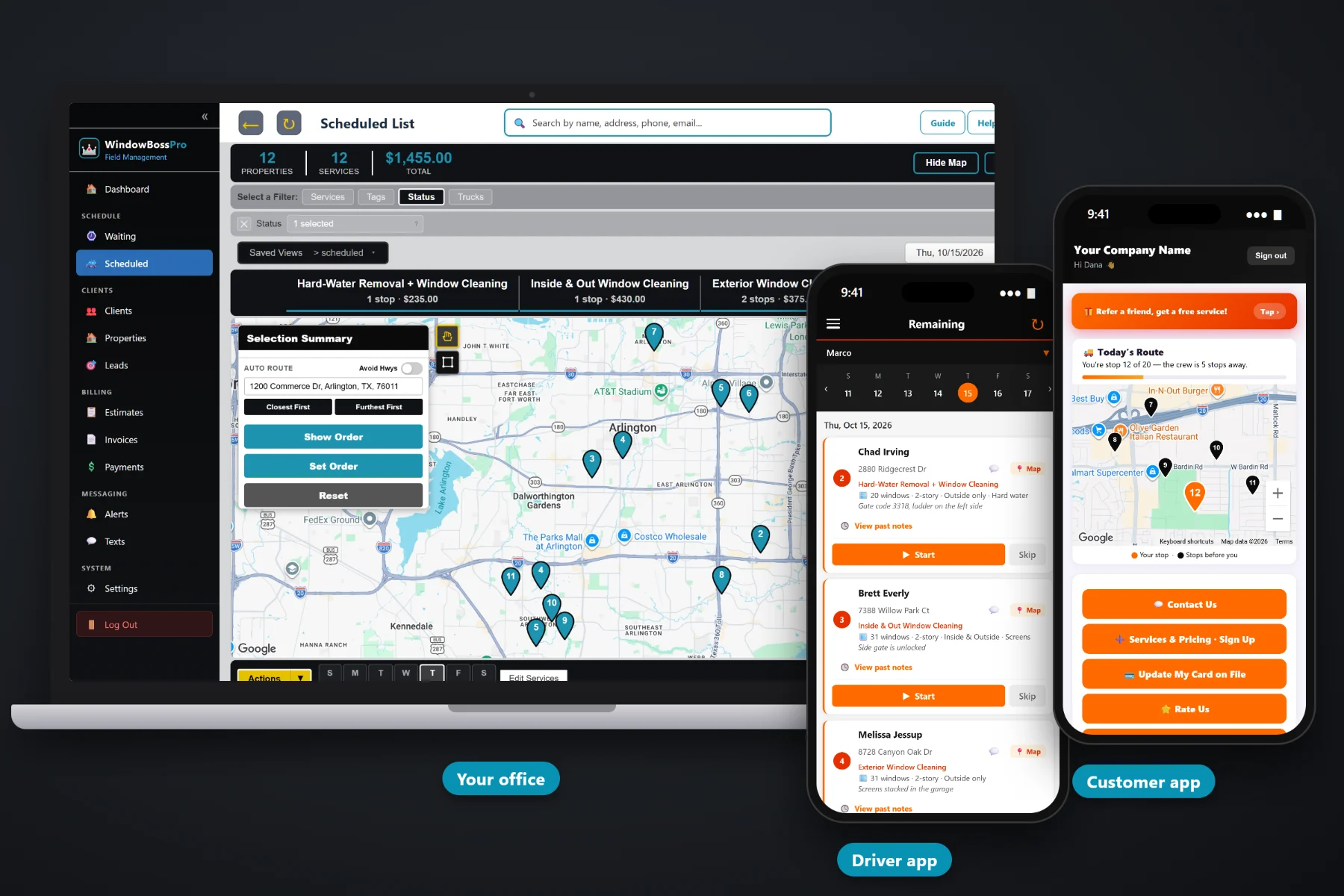
Window cleaning schedules fall apart in predictable ways: a quarterly customer nobody called back, a storefront that slipped a month, a van zig-zagging across town, a rain day that wiped out Tuesday. WindowBossPro puts every cleaning that came due on the Waiting List map, lets you build each van's day on the dispatch board, auto-routes Closest First or Furthest First from the shop, and sends the day to each tech's phone in that same order, with the window count, stories and access notes on every stop.
Plans start at $59/month and you are never billed per user, so the office, every tech and the owner all get access. The Waiting List, the dispatch board, auto-routing, crew GPS and customer texts are part of the platform, not an add-on. To see how routing fits with quotes, recurring plans and billing, start at WindowBossPro and then come back here for the scheduling side.
Every cleaning that came due, on a map and a list, pins colored not due yet, due now and overdue.
Jobs by day, filtered by van. The residential van and the storefront van each get their own day.
Closest First or Furthest First, then drag a stop where your judgment says it belongs.
“28 windows · 2-story · Inside & Outside · Screens” under the address, so you can size the day.
Sent from the tech's phone automatically. Customers choose their alerts and replies come to the office.
Every tech's location on the office map during the day, so the closest van gets the add-on.
A 12-window ranch and a 45-window three-story are not the same stop. WindowBossPro keeps the window count, stories, sides and extras on the address, so the person building the route sees how big each job is right next to where it is, and the tech sees the same details on their phone.
Most window cleaning owners build tomorrow's route at the kitchen table after a full day on the ladder. WindowBossPro is built for that: open the map, pick the jobs, route them, and the tech's phone is ready in the morning.
Storefronts every 14 or 30 days, homes every 90 or 180. Each address carries its windows, stories, sides and access notes.
The Waiting List shows every cleaning that came due, colored due now or overdue, so nobody falls through the cracks.
Assign jobs to a van and a day, then auto-route Closest First or Furthest First from the shop and adjust by hand.
The phone shows the stops in route order with navigation, window details, Start / Skip / Complete and automatic texts.
Generic field-service software treats every job as a time slot at an address. Window cleaning is not like that. The size of the job lives in the window count and the stories, storefronts want you there before the doors open, and quarterly homes come due whether anyone remembers them or not.
Ask a window cleaning owner how the schedule really works and you'll hear about a paper calendar, a spreadsheet of quarterly customers, and a whiteboard in the garage. Which homes are due this month and which ones you already did. Whether the bakery on Main was every two weeks or monthly. Why the van crossed the river twice on Tuesday.
When the plan, the address and the window details live together, the schedule builds itself from what came due and the route is a matter of picking stops on a map.
WindowBossPro keeps the plan, the windows, the address and the route in one place, from the first quote to the last stop of the day.
Every tool here exists to fill each van's day with the right jobs, in a sensible order, with fewer phone calls and fewer missed cleanings.
A live map and list of every cleaning that came due, colored not due yet, due now and overdue past a 7-day grace.
Minimum days between visits: 14 and 30 for storefronts, 90 and 180 for homes. Plans come due on their own.
Spring cleans, move-outs and post-construction jobs scheduled alongside the recurring work.
The Scheduled List and dispatch board show jobs by day and filter by van, residential or storefront.
Closest First or Furthest First from the shop, in one click, for each van's day.
Move a stop up or down when the storefront has to be done before 9 or the customer works from home after noon.
Window count, stories, sides and extras under the address on the lists and on the tech's phone.
Gate codes, dogs, where to set the ladder and skylights, right on the stop.
The day's jobs in the order you set, with a navigation button and Start / Skip / Complete.
Automatic, from the tech's phone. Customers choose night before, when they're next and when the tech arrives.
In the customer app: "You're stop 12 of 20 — the crew is 5 stops away" on a live map.
Crew locations from their phones show on the office map during the workday.
Text a customer from the office when a rain day moves their cleaning, and see the reply.
Techs clock in and out on the same phone that runs the route.
Complete creates the invoice and can charge the card on file before the van pulls away.
Plans are Start $59, Pro $89 and Crew $199 per month. Add the second van without a per-seat charge.
The Waiting List is where the day starts: a map of every cleaning that came due, from monthly storefronts to twice-a-year homes. The office picks the jobs for each van and day, auto-routes from the shop, and moves stops by hand where local knowledge beats the map. A common setup is one van on residential jobs and one on an early-morning storefront route. For the full walkthrough, read Window Cleaning Route Software: The Complete Guide to Scheduling Jobs and Building Routes.
Inside cleanings need someone home. Dogs need to be put away. Storefront managers want to know the glass got done before they opened the doors. WindowBossPro sends reminders the night before, on-the-way and arrived texts as the tech works the route, and shows the customer their place in line on a live map. Replies come back to the office through two-way texting.
Pick the plan that fits your operation. Every plan starts with a 14-day free trial and no credit card.
Compare plans on the pricing page.
Each plan has a minimum number of days between visits, such as 14 or 30 for storefronts and 90 or 180 for homes. When that many days have passed since the last cleaning, the job shows up on the Waiting List map as due. After a 7-day grace it turns overdue. You assign due jobs to a van and a day.
On the dispatch board, pick a van and a day and auto-route Closest First or Furthest First from your shop. Then move any stop by hand, for example to put a storefront first so it is done before the store opens.
Yes. Assign employees to vans and filter the Scheduled List and dispatch board by van. Each van gets its own day and its own route order, and each tech sees only their stops.
That is your call as the owner. You move the affected jobs to another day on the dispatch board, and you can text customers from the office with two-way texting. Recurring jobs that were not done stay due, so nothing disappears.
Yes. Crew GPS from the techs' phones shows on the office map during the workday. Customers who use the customer app also see their place in line, such as "You're stop 12 of 20."
Start is $59/month, Pro is $89/month, and Crew is $199/month. You are never billed per user, and every plan starts with a 14-day free trial with no credit card.
Routes and scheduling are one piece of how WindowBossPro runs a window cleaning company. For quotes, recurring plans, the tech app, commercial accounts and billing, see the full WindowBossPro platform overview.
Practical reading on the Waiting List, route order, residential and storefront vans, early-morning routes, sizing the day, rain and wind days, the spring rush, add-ons, customer texts, crew GPS, adding a second van and moving off paper.
A map of every cleaning that came due, a dispatch board for every van, auto-routing from the shop and the day on every tech's phone in order. Try WindowBossPro free for 14 days.