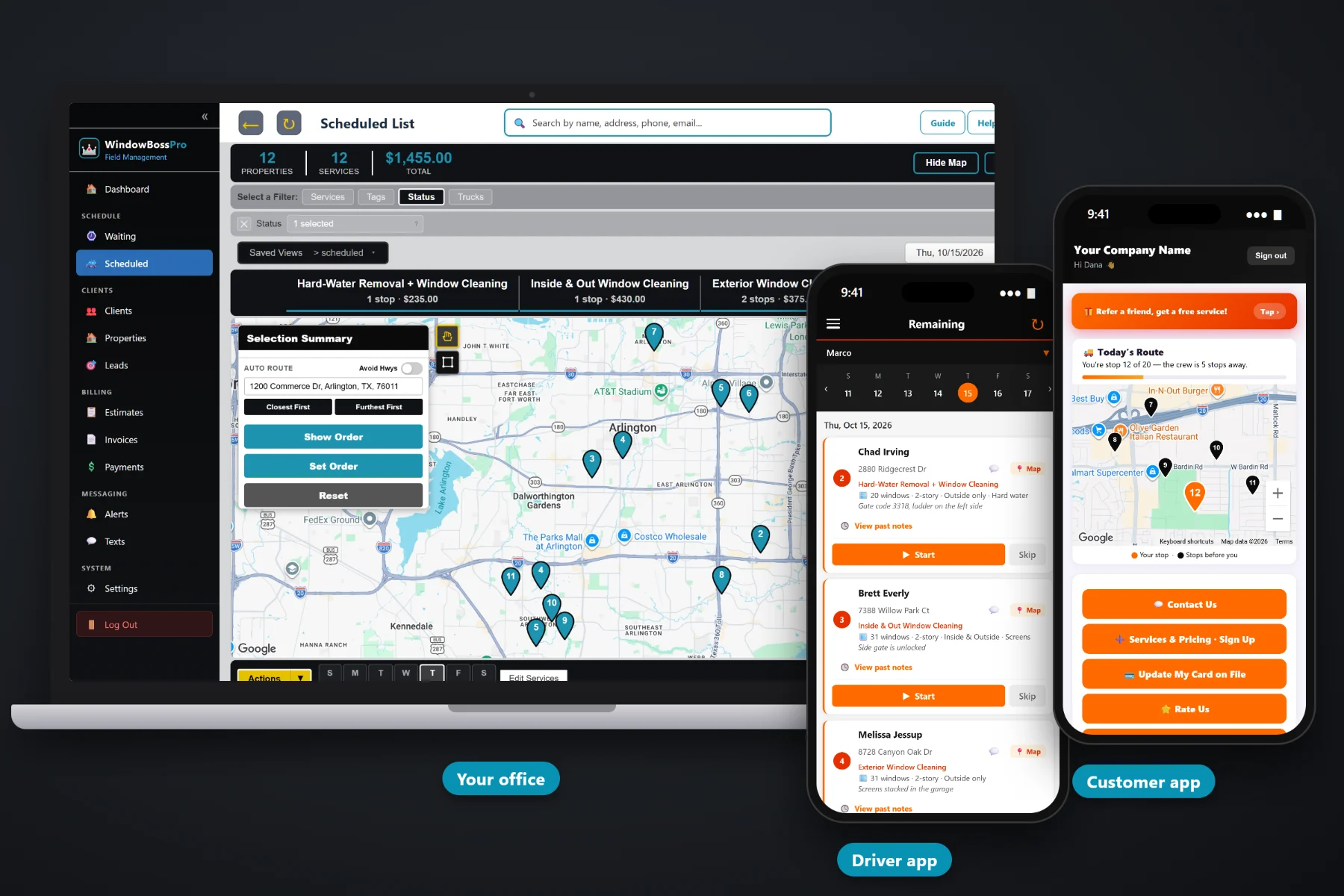
A window cleaning company that lives on spring cleans starts every year from zero. A company with plans starts the year with a route. WindowBossPro sets each home or storefront on a plan by minimum days between visits — 14, 30, 90 or 180 — and puts every cleaning that comes due on the Waiting List map, colored not due, due now or overdue. Reminders go out before the visit, the card on file is charged when the job is done, and accounts get one statement a month.
Plans start at $59/month and you are never billed per user. Recurring plans, the Waiting List, reminders, auto-charge and monthly statements are part of the platform, not an add-on you pay extra for. To see how recurring cleanings fit with quotes, routes, the tech app and billing, start at WindowBossPro and then come back here for the plan side of the business.
Every two weeks, monthly, quarterly or twice a year. Set the minimum days once and the plan keeps itself.
A live map and list of every cleaning that came due, so nobody keeps a calendar of who is next.
Pins show not due yet, due now, or overdue past a 7-day grace. The late ones stand out at a glance.
Automated texts and emails, plus the customer's own choice of night-before, when-they're-next and arrived alerts.
Card on file charged on completion or on a schedule, so plan customers never wait for a bill.
Property managers and businesses on Monthly get one statement covering every location, each line labeled by address.
A recurring cleaning in WindowBossPro is a service on an address with a minimum number of days between visits. When the van finishes a visit, the clock restarts. When enough days pass, the cleaning shows up on the Waiting List as due. If nobody gets to it, it turns overdue after a 7-day grace. Nobody keeps a wall calendar, and nobody has to remember the dentist office on Main.
Most window cleaners already have the customers. What they lack is a system that brings those customers back without a phone call every quarter. WindowBossPro keeps the plan on the address and puts the next visit in front of you when it is time.
Window count, stories, inside and outside, screens, tracks and access notes. Import your existing list by CSV if you have one.
Choose the minimum days between visits: 14, 30, 90 or 180. Tag it Quarterly, Storefront or Residential so it is easy to find later.
Every cleaning that came due shows on the map. Assign it to a van and a day, auto-route from the shop, and send reminders.
The tech taps Complete, the invoice is created and the card on file can be charged. The plan clock restarts on its own.
Recurring work only pays if it actually recurs. A quarterly customer who quietly slips to once a year is a customer you lost without noticing. Spreadsheets and paper hold the list, but they never tell you who is due this week.
Ask any window cleaner with a few hundred customers how they track recurring work and you will hear about a spreadsheet with a “last cleaned” column, a box of index cards, or a phone full of reminders. It works in March. By July, the storefront that should have been cleaned twice is still sitting at one visit, and the quarterly homeowner who never heard from you booked somebody else.
The plan belongs on the address. When the days between visits live with the customer, the software can tell you who is due, who is overdue and where they are on the map.
WindowBossPro keeps the plan, the windows, the address and the billing in one place, so the second, third and tenth visit happen as reliably as the first.
Every tool here exists to keep plan customers on schedule, keep the vans full and keep the money coming in without chasing it.
14, 30, 90 or 180 days per plan. The next visit comes due from the last completed one.
Every due cleaning on a live map and list, ready to assign to a van and a day.
Not due yet, due now, and overdue past a 7-day grace, right on the pins.
Residential plans that match how homeowners actually think about clean glass.
Storefront routes that come due like clockwork and fill a van by themselves.
"28 windows · 2-story · Inside & Outside · Screens" under the address on the list and the phone.
Quarterly, Storefront, Residential and Commercial tags for filtering, reports and campaigns.
Spring cleans and move-outs live next to plans, so converting one to the other is a small step.
Automated texts and emails before visits. Customers pick night before, when they're next and arrived.
Card on file charged on completion or on a schedule.
One statement a month for property managers and businesses, every location labeled by address.
Text plan customers from the office and see their replies in one thread.
See your recurring customers, what they bring in, and who has gone quiet.
Auto-route Closest First or Furthest First from the shop, filter by van, set route order.
Plan customers see their invoices, update their card, request service and watch the crew on a live map.
Plans are Start $59, Pro $89, and Crew $199 per month, not a per-seat charge.
Once enough customers are on plans, the week starts to build itself. The Waiting List shows what came due, the office assigns it to a van and a day, and auto-route orders the stops Closest First or Furthest First from the shop. A common setup is one van on residential quarterly and twice-a-year homes and one on a monthly storefront route. For the full walkthrough, read Recurring Window Cleaning Software: The Complete Guide to Plans That Come Due on Their Own.
A plan customer should never wonder when the window cleaner is coming. Automated reminders go out by text and email, and customers choose their own alerts: the night before, when they are next on the route, and when the tech arrives. In the customer app they can watch the crew on a live map, request an extra cleaning, update their card and pay invoices. Replies come back to the office through two-way texting.
Pick the plan that fits your operation. Every plan starts with a 14-day free trial and no credit card.
Compare plans on the pricing page.
Each plan has a minimum number of days between visits: 14, 30, 90 or 180. When a visit is completed, the count starts again. Once enough days have passed, the cleaning shows on the Waiting List as due now, and if it is still not done after a 7-day grace it shows as overdue.
Yes. Storefronts usually run monthly or every two weeks, and homes usually run quarterly or twice a year. Each address carries its own plan, and tags like Storefront and Quarterly make them easy to filter.
Yes. Spring cleans, move-outs and other one-time jobs sit right alongside plans. When a one-time customer agrees to a plan, you set the days between visits on that address and the next cleaning comes due on its own.
With a card on file, charged when the tech taps Complete or on a schedule you set. Property managers and businesses set to Monthly get one statement a month covering every location, with each line labeled by address.
Yes. Automated reminders go out by text and email, and customers choose their alerts in the customer app: night before, when they are next, and when the tech arrives. Plans include a monthly text allowance of 500, 1,000 or 2,000 segments sent and received on Start, Pro and Crew.
Start is $59/month, Pro is $89/month, and Crew is $199/month. You are never billed per user, and every plan starts with a 14-day free trial with no credit card.
Recurring plans are one piece of how WindowBossPro runs a window cleaning company. For quotes, routes, the tech app, commercial accounts and billing, see the full WindowBossPro platform overview.
Practical reading on quarterly and twice-a-year home plans, monthly and every-two-weeks storefronts, the Waiting List, plan pricing, reminders, auto-charge, statements, skipped visits, seasonal timing, cancellations, win-backs and keeping the route full all year.
Quarterly homes and monthly storefronts that come due on their own, reminders before each visit, auto-charge on completion and one statement a month for accounts. Try WindowBossPro free for 14 days.