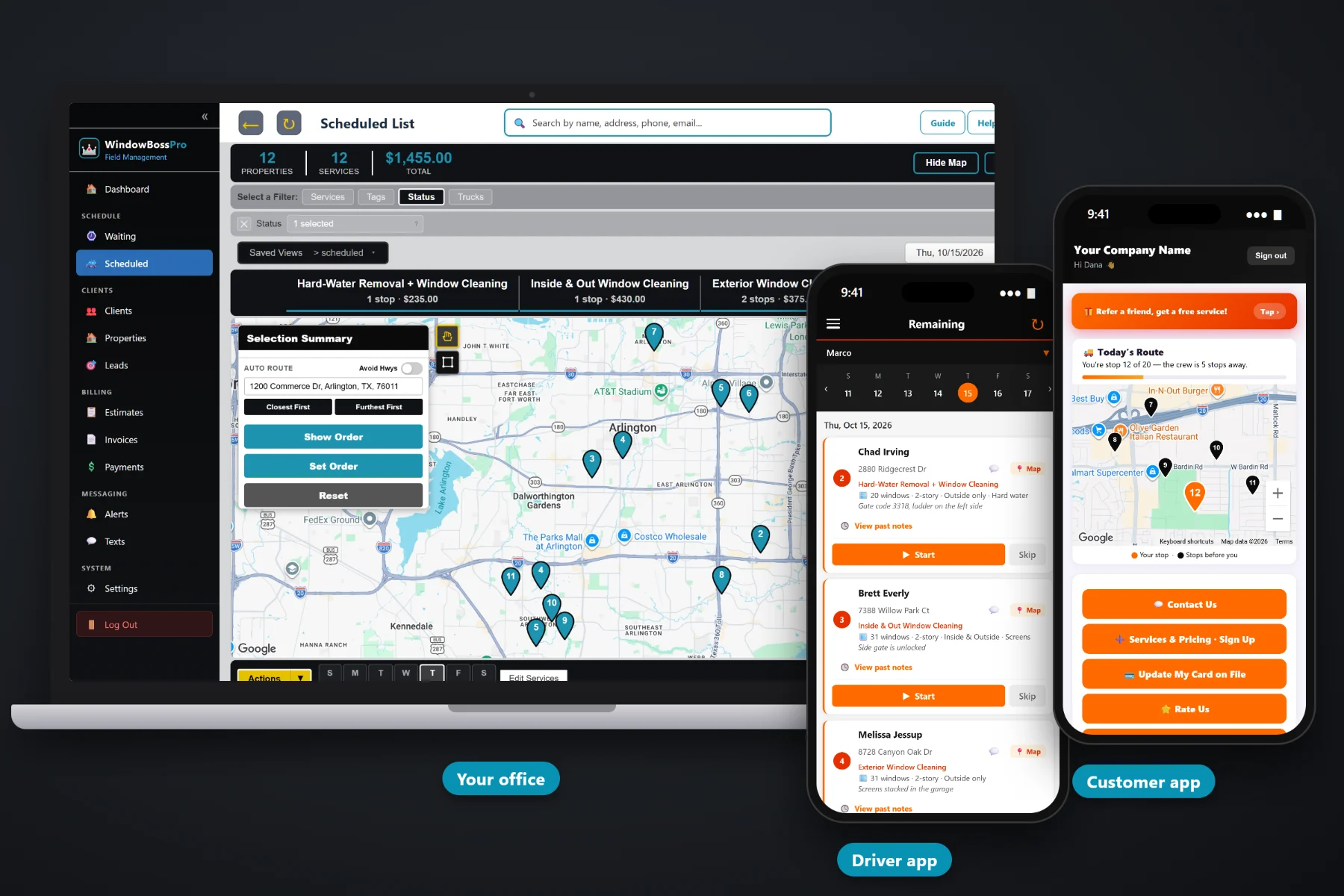
A storefront route is thirty businesses that each want clean glass before the doors open, and a property manager is one person who wants one bill for twelve buildings. WindowBossPro keeps every location on its own address under one account, brings each storefront due on its own every two weeks or every month, puts back-door and alarm notes on the tech's phone, saves proof-of-service photos, and sends one monthly statement that lists every location by address.
Plans start at $59/month and you are never billed per user, so the storefront tech, the residential crew and the office all get access. Multi-location accounts, monthly statements, access notes, photos and online quote approval are part of the platform, not an add-on. To see how commercial work fits with residential plans, the Waiting List and routing, start at WindowBossPro and then come back here for the storefront side.
A property manager is one client with every building listed under them, each with its own window details and notes.
Set an account to Monthly and every visit that month lands on one statement, each line labeled with the address.
Every two weeks or every month, each storefront shows up on the Waiting List when it is due.
Access notes live on the address and show on the tech's phone for the 6am visit.
Before and after photos stay with the visit, ready for the manager who asks if anyone came.
Build the estimate from your service list and the manager approves it online. Approved work becomes scheduled service.
Whoever sold the account recorded how many panes, which sides get cleaned and how to get in before the doors open. WindowBossPro keeps that on each address and puts it on the tech's phone in route order, so a new tech can run the early storefront route without a ride-along and without calling the owner at 5:45am.
Commercial window cleaning is not complicated work. It is a lot of small details spread across a lot of addresses. WindowBossPro gives each detail one home, so the office is not rebuilding the same account every month from emails, texts and a spreadsheet.
Create the business or property manager as one client, tag it Storefront or Commercial, and add every location as its own address.
Window count, stories, sides, extras and access notes on each address, so every location carries its own details.
Every two weeks or every month by minimum days between visits. Each location comes due on the Waiting List on its own.
Set the account to Monthly and every visit lands on one statement, each line labeled with its address.
Generic field-service software assumes one customer at one address paying one invoice per job. A property manager has eleven addresses, wants one bill, needs a photo for the regional office and changes the back-door code without telling anyone.
Ask anyone running a storefront route how the month really goes and you will hear the same story: a spreadsheet of businesses with a column for “last cleaned” that nobody updated, a key on a ring with a strip of tape on it, and a property manager asking why there are nine invoices in her inbox instead of one.
That information belongs on the account and its addresses, not in the owner's head. When it lives there, any tech can run the early route and the office can answer a manager in one text.
WindowBossPro keeps the account, its locations, the glass and the billing in one place, from the first quote to the monthly statement.
Every tool here exists to keep a storefront route on its cycle, keep property managers informed and get one clean bill out the door each month.
One property manager, every building under them, each address with its own window details.
One statement per account each month, every line labeled with the address it covers.
Every 14 or 30 days by minimum days between visits, so storefronts come due on their own.
Every due cleaning on a live map, pins colored not due, due now and overdue past a 7-day grace.
Filter the dispatch board by van and keep one van on the storefront route.
Closest First or Furthest First from the shop, then set the order by hand if you want.
Back doors, lockboxes, keys and alarm notes on the address and on the tech's phone.
Before and after photos saved with every visit.
Tag accounts Storefront or Commercial and add custom fields like PO number or manager name.
See work and billing by client, so you know which accounts carry their weight.
Estimates built from your service list. The manager approves online and it becomes scheduled service.
Text property managers and store owners from the office. Replies come back to the office.
Night-before, on-the-way and arrived alerts by text and email, chosen by the customer.
Charge on completion or on a schedule, or send the monthly statement and collect online.
Runs in the browser on iPhone and Android. Company login plus a personal PIN.
Plans are Start $59, Pro $89, and Crew $199 per month, not a per-seat charge.
Each storefront and each property manager location sits on a cycle set by minimum days between visits, usually 14 or 30. When a location comes due, it shows on the Waiting List map. The office drops it on the storefront van's day, auto-routes Closest First or Furthest First from the shop, and the tech's phone shows the same order. Residential work can run on a second van the same day. For the full walkthrough, read Commercial Window Cleaning Software: The Complete Guide to Storefront Routes and Property Manager Accounts.
A property manager does not want to chase you. They want to know the glass was cleaned, see it if they ask, and pay one statement a month. Monthly billing puts every location on one statement with the address on each line. Photos from the visit back up every line. Two-way texting lets the office answer from the account record, and the customer app shows invoices, lets them pay online and request service.
Pick the plan that fits your operation. Every plan starts with a 14-day free trial and no credit card.
Compare plans on the pricing page.
Yes. A client can have as many addresses as you need. Each address keeps its own window count, stories, sides, extras and access notes, and each can be on its own cleaning cycle.
Yes. Set the account to Monthly billing and they get one statement each month covering every visit at every location, with each line labeled with the address.
Each location has a minimum number of days between visits, usually 14 for every two weeks or 30 for monthly. When that time has passed, the location shows on the Waiting List map as due, then overdue after a 7-day grace.
In the access notes on the address. They show under the address on the office lists and on the tech's phone, behind the tech's personal PIN.
WindowBossPro is built for residential and low-rise commercial work done from the ground, ladders and poles. It does not plan rope access, swing stages or the safety paperwork high-rise work needs. You can still keep a high-rise client and bill them, but the specialized planning is outside what the software does.
Start is $59/month, Pro is $89/month, and Crew is $199/month. You are never billed per user, and every plan starts with a 14-day free trial with no credit card.
Commercial accounts are one piece of how WindowBossPro runs a window cleaning company. For residential plans, the Waiting List, routing, the tech app and billing, see the full WindowBossPro platform overview.
Practical reading on building a storefront route, selling door to door, restaurants, offices, medical buildings, banks, dealerships, strip centers, property managers, monthly statements, access notes, photos, quotes and keeping accounts renewing.
Storefront cycles, many addresses per account, access notes, proof-of-service photos and one statement per property manager. Try WindowBossPro free for 14 days.